





Jump To: Support > KB > NetManager > Proxy > Filtering
Web proxy filtering
Filter types
The NetManager includes a web-proxy which has powerful filtering. The filter types in the order they are presented on the <Please choose filter type> menu are:
- List of addresses and domains - a general purpose list of websites and IP addresses. N.B. domain will also match sub-domains (e.g. bbc.co.uk will also match news.bbc.co.uk). Do not put in whole URLS, i.e. no http:// or /path at the end
- URL domain - exact match on domain and subdomain, i.e. no http:// or /path at the end
- URL domain regular expression - regular expression string match anywhere in the domain (e.g. sex will block essex.gov.uk)
- Regular expression in whole URL - regular expression string match anywhere in the whole URL, (e.g. sex will block http://www.bbc.co.uk/news/england/essex and essex.gov.uk)
- Regular expression in file path - regular expression string match excluding the domain (e.g. sex will block http://www.bbc.co.uk/news/england/essex, but NOT essex.gov.uk)
- Users and groups - select on basis of user or user group. Requires some method of logging in so that the user is known
- Client IP addresses - select based on the IP address of the machine accessing the proxy, useful for separating servers from client computers, or different VLANs
- Client Ethernet/MAC addresses - select based on the MAC address of the machine accessing the proxy, note this can only work when the client is on a network directly connected to the proxy (not routed via a switch for example)
- Time and day of week - time-sensitive selection
- File extension (e.g. .exe) - looks at file type being accessed, useful for blocking downloads
- Web server IP addresses - select based on the IP address of the destination web server
- Port on web server - http is port 80, https is 443. Some web addresses can override these, e.g. http://server:1234/ is port 1234
- Local Port on proxy - the proxy port being accessed. In conjunction with per-group group policies, this is an easy way to distinguish between user groups. Also useful for transparent proxying
- Local IP address on proxy - the IP address being accessed on the proxy
- Protocol (e.g. FTP, HTTP) - could be used to block rtsp or ftp requests
- Method (e.g. GET, CONNECT) - very powerful, but usually used to select https (CONNECT) vs http (all other methods)
- Regular expression match against User-Agent - matches what the client identifies itself as, e.g. to distinguish Chrome from Safari or to allow certain programs past blocks (e.g. Java)
For reference, URLs are in the format: protocol://domain:port/path?query
Configuring
Filtering is configured from within webadmin by going to Web Proxy > Filtering.
Configuring filtering is a two-stage process:
First, you create a number of filters (of the above types). These will give a yes/no answer when you try to access a website. For instance, if you have a domain block of facebook.com, then this will trigger whenever a user tries to visit facebook.com (or www.facebook.com).
Secondly, you need to use these filters to create access rules. Once a new rule is added (or edited) you can configure it by creating an English-like sentence from the drop-down menus. e.g. Blocked If Blacklist. You can combine filters to create more complex rules such as Block If Games And not Lunchtime.
Remember to always click the Make changes live button
Example
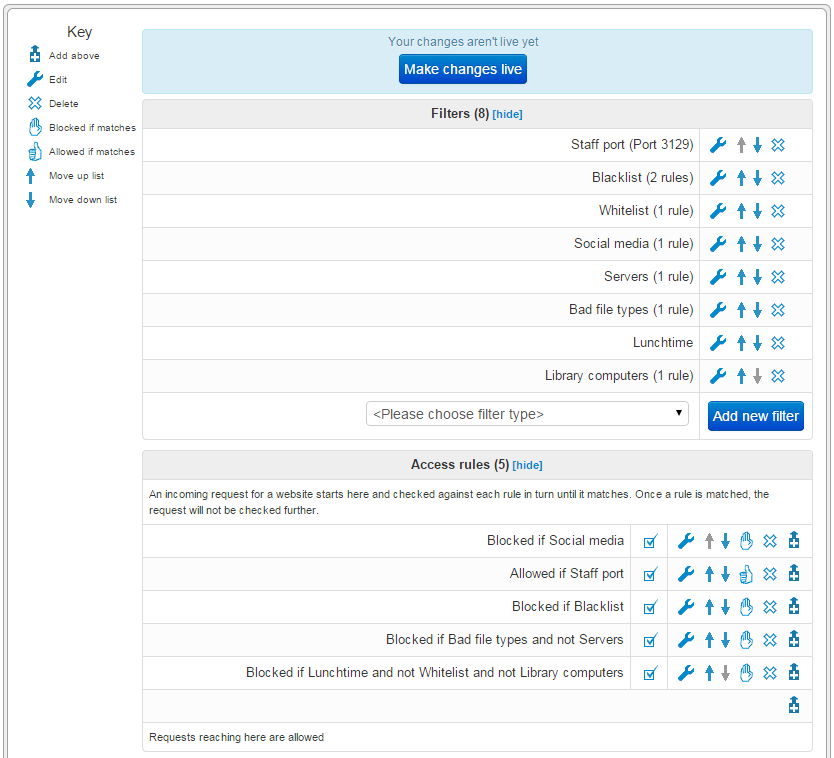
There are 8 filters defined of different types:
- Whitelist, Blacklist and Social media are lists of domains
- Servers is an IP address range
- Lunchtime is a day/time filter
- Bad file types is a list of file extensions
- Staff port is a port on proxy filter
- Library computers is a list of MAC addresses
Once defined, the filters can be hid with the [hide] action.
The filters are then combined to achieve the following:
- No machine or user in the school can access social media
- All other access when logged on a staff member is unfiltered
- A blacklist of sites are blocked
- Files such as .exe are blocked on all machines that aren't servers
- At lunchtime, only sites on a whitelist can be accessed unless you are in the library
N.B. Note that the order of filters is important, the blacklist and file types lists will not affect staff members as they have been granted full access above.
Content filtering
The NetManager web-filter can also check the content of pages for dubious words and phrases. For more information, see here.