





Joe
Jump To: Support > KB > NetManager > Joe
To edit a text file in a command line environment, with a friendly editor, you can use Joe.
To open a file for editing type joe followed by the filename(s) you wish to edit. e.g.:
joe /path/to/file
You can also change to the directory containing the file and then specify just the filename, e.g.:
netmanager 1# cd /etc/netmanager
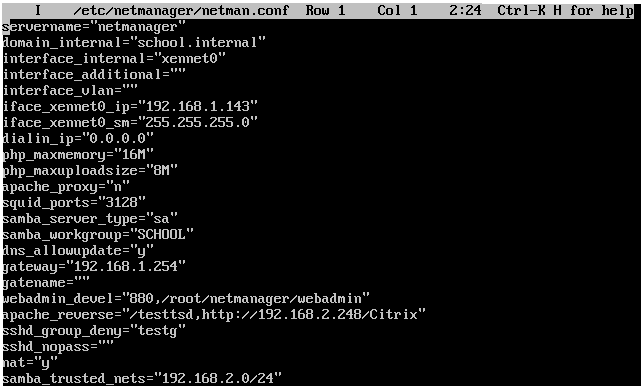
netmanager 2# joe netman.conf
Once your file is open in the editor, you can use the cursor keys, page up, page down, delete, etc. just as you would expect.
To abort editing press "CTRL+C". To exit, saving any modifications, press "CTRL+K", then "X".
Further commands can be listed by pressing "CTRL+K", then "H". From the help documents (N.B. ^ means CTRL, i.e. CTRL-A moves to beginning of line):
 CURSOR           GO TO            BLOCK      DELETE   MISC         EXIT
 ^B left ^F right ^U  prev. screen ^KB begin  ^D char. ^KJ reformat ^KX save
 ^P up   ^N down  ^V  next screen  ^KK end    ^Y line  ^KA center   ^C  abort
 ^Z previous word ^A  beg. of line ^KM move   ^W >word ^T  options  ^KZ shell
 ^X next word     ^E  end of line  ^KC copy   ^O word< ^R  refresh  FILE
 SEARCH           ^KU top of file  ^KW file   ^J >line SPELL        ^KE edit
 ^KF find text    ^KV end of file  ^KY delete ^_ undo  ^[N word     ^KR insert
 ^L  find next    ^KL to line No.  ^K/ filter ^^ redo  ^[L file     ^KD save

 ^KO Split the window in half           ^KE Load file into window
 ^KG Make current window bigger         ^KT Make current window smaller
 ^KN Go to the window below             ^KP Go to the window above
 ^[V Switch to next buffer              ^[U Switch to previous buffer
 ^C  Eliminate the current window       ^KI Show all windows / Show one window
Screenshot of joe being used to edit netman.conf