





Jump To: Support > KB > NetManager > Email > Spam
Email Spam Filtering
Greylisting
When valid emails are sent, but the destination mail server is temporarily too busy (or otherwise unavailable), they will sit in a queue on an intermediate server which will periodically retry delivering the mail. In this way, temporary downtime on the destination server will not stop mail being reliably delivered. Greylisting uses this feature to stop large amounts of spam.
When someone first sends you an email, their server will be told to try again later. A note is kept so that when they try again (after a certain greylist period has elapsed), the mail will be accepted immediately. As a valid mail server will always try again, the mail will be delivered safely. Spam mail is very rarely sent via valid mail servers (as doing so would make it easy to track) and as the spammers are sending millions of unsolicited mails, they will not bother trying to remember to track and retry any mails which cannot be immediately delivered.
Enabling greylisting means a small delay the first time someone first sends you an email, but blocks a very high proportion of junk mail. Greylisting relies on any retries coming from the same server that connected originally; some senders have a pool of machines (e.g. twitter.com has a pool of around 40 machines that may attempt to send the same mail. Problem senders such as Twitter are added to a whitelist that we maintain (so please let us know of any problems you encounter). SPF-enabled senders can bypass greylisting if required.
Greylisting is not enabled by default because we feel our customers should be aware of the time-delay and pool sending aspects before proceeding. If greylisting is enabled, any senders added to the whitelist in Email > Mail blocks > Allow by sender in webadmin will not be greylisted.
Configuration options for greylisting
Greylist can be altered with the following configuration options in the configuration file:
mail_greylist(default n) - whether to enable greylisting, set to y to enablemail_greylist_spf(default n) - whether to allow senders with valid SPF records to bypass greylisting, set to y to allow bypassmail_greylist_always- space-separated list of senders to always greylistmail_greylist_never- space-separated list of senders to never greylist
Scanning all mails for content, patterns, etc.
Scanning of all emails for spam is an optional module available for NetManager. This page assumes you have already purchased this and that it is installed.
All emails travelling through the system (either in or out) are assessed by the spam filter. Mail that has been received from trusted networks (e.g. your LAN) will be passed through without further checking. All other emails are rated according to a number of different metrics. For example:
- How much it looks like emails that are known to be spam (Bayesian filtering)
- Sending IP address is on known blacklists
- Mentions Viagra or other such pharmaceuticals
- From: address is incorrectly formed
- Message is HTML only
- Date is clearly wrong
- Mail format is incorrect
The full list can be seen here.
Each mail will be given a numeric rating and it is this rating that determines what happens to it. Firstly, we should distinguish between clearly spam and suspected spam.
Mails with a very high rating (by default 10) are almost certainly spam and should be rejected or dropped. Mails with very low ratings are safe and should be delivered. Intermediate mails are probably spam, but we can't be 100% sure (after all, one person's junk mail is another person's must-have subscription). Therefore mails above a certain lower number (by default 5) will be flagged as spam (***SPAM*** will be added to the start of the Subject line - this string is configurable), but they will still be delivered. The mail will be altered so that it shows which particular tests it failed.
Specifying senders who should not be filtered
If greylisting or spam-filtering are enabled, any senders added to the whitelist in Email > Mail blocks > Allow by sender in webadmin will not be greylisted or filtered. You may add individual addresses (e.g. user@mydomain.com) or whole domains (e.g. mydomain.com).
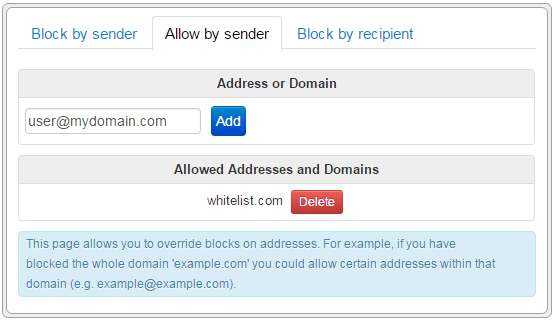
Default behaviour.
- Mail with a rating of 10 or higher will be rejected. This will send the mail back to the sender. However, as most spams use made-up addresses (or addresses of innocent victims), this can result in backscatter whereby innocent people receive bounced emails that they did not send.
- Mail with a rating of 5 or higher will be flagged as spam, but still delivered to the original user
- All other mail will be delivered as usual
Other options
- Do not reject any mail (to avoid back scatter), but:
- Deliver all mail flagged as spam to another mailbox or:
- Drop all mail flagged as spam silently (but beware of false positives).
N.B. Currently the software only allows you to redirect all mail flagged as spam, not just that above an upper limit (i.e. you can't just redirect definite spam whilst continuing to only flag suspicious mail). You must be wary of false positives (i.e. interfering with good mails).
Configuration options
The spam filter can be altered with the following configuration options in the configuration file:
spam_level(default 5) - level above which mails are flagged as spamspam_reject(default 10) - level above which mails are rejected. Set to 0 to not reject any mailsspam_bayes(default y) - whether to enable Bayesian filteringspam_autolearn(default y) - whether to mark senders who have sent mail rated spam before even more highlyspam_languages(default empty) - space-separated list of languages which are considered acceptable for incoming messages (from valid languages list)spam_redirect- email address to redirect mail abovespam_levelto. Set to devnull to silently drop
Configuring your own rules
Please click here for details on defining your own extra rules