Desktop and Server Virtualisation Specialist
Login
Precedence Technologies Ltd
Technology House, 36a Union Lane
Cambridge, CB4 1QB, United Kingdom
T: +44 (0)8456 446 800 / +44 (0)1223 359900
E:
enquiries@precedence.co.uk
Solutions
Windows 10 in 10
Remote Access
Green Computing
Server Virtualisation
ICT Budgets
Virtual Desktops/Apps
Bring Your Own Device
Products
NetManager
Web security
Email
Backup Server
FileSurfer
ThinIT
For PC
Thin clients
Lenovo Infrastructure
xSeries Servers
System Storage
ServiceSuite
Citrix
XenApp
XenDesktop
XenServer
Virtual GPUs
Software
Microsoft
Serif Creative
ESET NOD32 Antivirus
ESET Enterprise Encryption
AB Tutor
Desktop-as-a-Service
Remote SafeGuard
Services
Support
Installations
PAT and Auditing
Training
Consultancy
Managed Services
Technician Services
Internet
Domains & Prices
Email
Web serving
Dedicated servers
SurfYourOwn CMS
SSL Certificates
Support
Support
Wiki
On-line tools
Hide Drives GPO
School year tables
Citrix Licence Merger
Projector calculator
SIMS to email
Warranties
Downloads
Manuals
Internet Services
NetManager
Your details
News
Business Continuity
20 years old!
FREE Safeguard Setup
ThinIT discount
About
Contact
Customers
Staff
Careers
T&Cs
GDPR
Home
Support
Manuals
Ica
Macos
<< Back
|
Up
|
Next >>
Step 1
Download
the Citrix Online plug-in for Mac
from the
Citrix download
site.
Install as usual (into Applications)
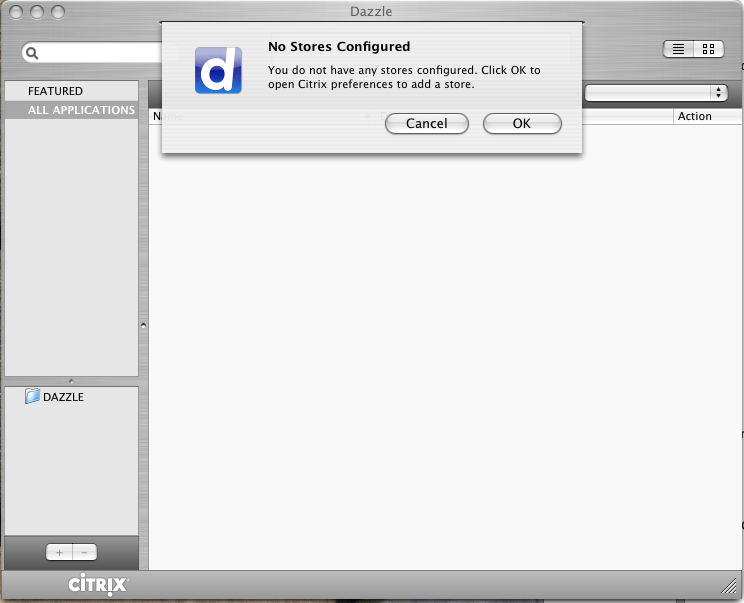
Run the Dazzle application that is installed
Click on OK when prompted to add a store; this will open up System Preferences
<< Back
|
Up
|
Next >>