





Precedence Software: TinyThumb
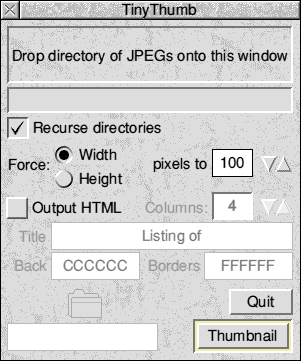
TinyThumb is particularly useful for use with digital cameras as they can often produce very large images with cryptic filenames which can take a long time to search through if you want to locate a certain photo.
N.B. TinyThumb uses ChangeFSI to do the dirty work, so you must make sure you have a copy that has been seen by the Filer.
Download TinyThumb v1.05 (5th December 2003)
History
| 1.00 | 15/5/02 | First released version |
| 1.01 | 13/11/02 | Fixed failing with long file names Web link now works correctly Path displayed in HTML is, by default, a Unix-style relative path (see Messages for more information). |
| 1.02 | 17/12/02 | Added support for saved configurations |
| 1.03 | 19/2/03 | Recursion check is now case-insensitive Increased possible debugging Checks for failed startup of ChangeFSI More error checking on thumbnails (or lack thereof) |
| 1.04 | 24/11/03 | Add option to set title/heading on HTML pages Add support for defining page and table colours |
| 1.05 | 5/12/03 | Fix relative display names not working |
FAQ
No thumbnails are produced
- You must be using decent version of ChangeFSI. You can get 1.15 from the RISCOS Ltd website.
- You may need to increase the ChangeFSI cache size if your input images
are very large. To do this, press F12 and type:
Set ChangeFSI$Cache 512K
- You may need to remove your Choices file from inside ChangeFSI
I'm getting an error about "Can't find CompressJPEG module"
- Try increasing the size of the module area. Click on the Task Manager, scroll down until you find Module area and drag the bar slightly to the right to increase it by about 60k.
When I click on the thumbnail to view the original, the picture is really small or the picture does not work in !Draw.
- TinyThumb does not affect the original JPEGs at all, so you will find the same thing would happen even if you'd never used TinyThumb. We suggest you process the JPEGs with Jclean which can be got from here.
I get a white task window with "Press SPACE or click mouse to continue" for each JPEG
- This is not from TinyThumb. You are using CompressJPEG 0.14 which comes with ChangeFSI 1.25 as supplied with RISCOS 4.29. This module appears to contain some old debugging code which prints text out. Solution is to either get a newer CompressJPEG module that doesn't do this (if it exists) or use ChangeFSI 1.15 after ensuring that CompressJPEG 0.14 is not loaded at boot time.
I've tried printing a thumbnail page from Fresco and it crashes
- We've had a report that if you print in landscape mode (and have a reasonable amount of images) this can happen. This is a bug in Fresco (and occasionally Oregano2 too) and would happen on any page of a similar size. You could also try clearing the "Back" and "Borders" colour boxes, so that coloured backgrounds are not used.
I've cleared the Title box and it still puts the path of the image directory in the HTML
- This is by design, so that you can see where you are in a hierarchy of pictures. However, until version 1.06 the path was not displayed relative to the starting directory (even though it should have been since 1.02), i.e. Paths looked like ADFS::Harddisc4/$/Images rather than just Images.
By default, the path name is always appended to the title, but this is all configurable. In the Messages file, you will see:# In htmlhead and htmlpagehead: # %0 = Full RISCOS path to folder (default in v1.00) # %1 = Relative RISCOS path # %2 = Relative Unix-style path (default from v1.01 onwards) # %3 = Title htmlhead:<html><head><title>%3 %2</title></head> htmlpagehead:<h2>%3 %2</h2>
You may edit the lines as you wish. If you remove or alter %2 the displayed path will be removed or changed.
Top | Download | History | FAQ
The software on this server is provided "as is"; Precedence Technologies Limited ("PTL") makes no warranty, express or implied, of the merchantability of this software or its fitness for any particular purpose. In no circumstances shall PTL be liable for any damage, loss of profits, or any indirect or consequential loss arising out of the use of this software or inability to use this software, even if PTL has been advised of the possibility of such loss.