





SAN-V3700Disks
Jump To: Support > KB > IBM > SAN > V3700Disks
V3700 - forgetting failed disks
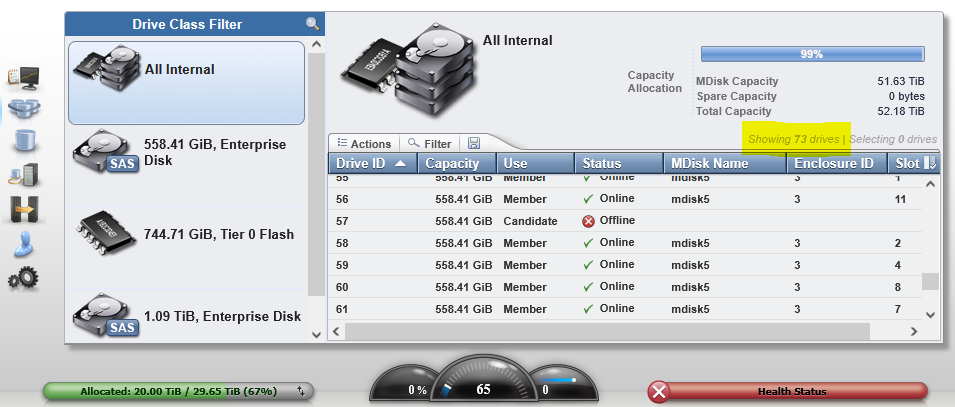
When you swap out a failed disk (following the fix procedure in the GUI), you may be left with the old disk still being shown as offline and thus it'll still show an error. Each disk has its own ID and so when you add the replacement, that gets a new ID leaving the old one hanging.
The screenshot below shows it knows about 73 drives (in a system that can only take 72) and that drive ID 57 is offline:
To fix this, you need to ssh to the SAN and remove the drive from the command line. To do this, change its status from offline to unused with the chdrive -use unused <DriveID> command:
% ssh superuser@san01
(superuser@san01) Password:
IBM_Storwize:SAN01:superuser>lsdrive -filtervalue status=offline
id status  error_sequence_number use       tech_type       capacity
57 offline                       candidate tier_enterprise 558.4GB

IBM_Storwize:SAN01:superuser>lsdrive 57
id 57
status offline
error_sequence_number
use candidate
UID 5000cca0223f3928
tech_type tier_enterprise
capacity 558.4GB
block_size 512
vendor_id IBM-A040
product_id HUC109060CSS60
FRU_part_number 00Y2430
FRU_identity 11S49Y7448YXXXKNW3SWJF
RPM 10000
firmware_level J2EG
FPGA_level
mdisk_id
mdisk_name
member_id
enclosure_id
slot_id
node_id
node_name
quorum_id
port_1_status offline
port_2_status offline
interface_speed
protection_enabled no
auto_manage inactive
drive_class_id 0
write_endurance_used 0
write_endurance_usage_rate
replacement_date

IBM_Storwize:SAN01:superuser>chdrive -use unused 57