





Jump To: Support > KB > Citrix > XenServer > SRIOV
SR-IOV NICs on XenServer and XCP-ng
SR-IOV allows physical network cards (NICs) to present virtual copies of themselves as Virtual Functions (VFs) to Virtual Machines (VMs). This allows VMs to speak directly to the hardware rather than through the paravirtualised drivers (or worse, emulated devices) thus increasing performance as well as segration.
Here are some notes from implementing this on XenServer 8.4 (patched as per 29th April) and XCP-ng 8.3.
Enabling SR-IOV
The main test XenServer host has an onboard quad-port Intel i350 NIC and a dual-port PCIe Intel X540-AT2 NIC both of which support SR-IOV as shown in XenCenter:

In addition, there was also access to another XenServer host with a dual-port Intel 82599ES NIC and a Broadcom BCM57416 NIC (which does not support SR-IOV):

To enable SR-IOV on the i350 NIC (deemed to be a legacy driver), /etc/modprobe.d/igb.conf was edited as follows:
# VFs-maxvfs-by-default: 7
# VFs-maxvfs-by-user: 4 <--- added a 4 here
options igb max_vfs=0
Next, a SR-IOV network was created on one of the NICs:
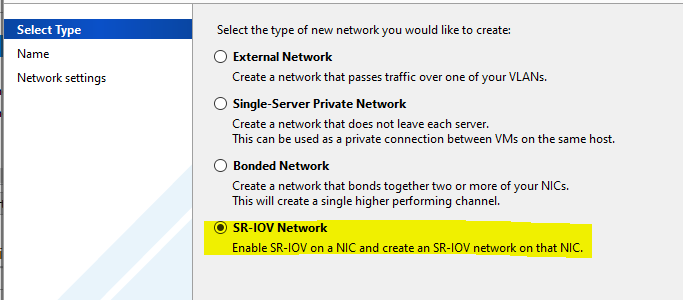
The server was rebooted and /etc/modprobe.d/igb.conf had been re-written to:
# VFs-maxvfs-by-default: 7
# VFs-maxvfs-by-user: 4
options igb max_vfs=4,4,4,4
The screenshot of the NICs above shows that SR-IOV is enabled on NICs 1, 2, 4 and 5 .
Use with VMs
XenCenter (and XCP-ng Center) may not allow you to pick the SR-IOV networks for existing VMs when adding a NIC to a VM as they are missing from the list. This is because the template the VM they were created from did not support SR-IOV (e.g. Other Install Media as you might use for a BSD):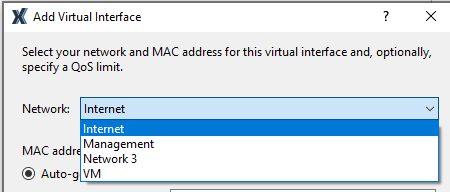
XenOrchestra will allow to pick the SR-IOV networks though: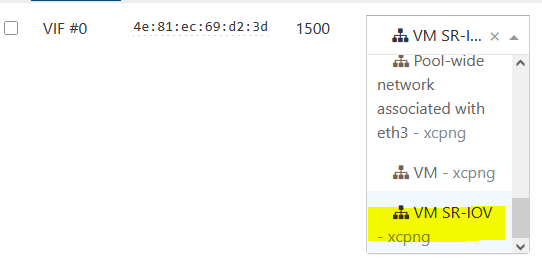
If not using XenOrchestra, you will need to add the NIC from the command-line:
- First using XenCenter, if not already present, create a virtual NIC (VIF) for the VM attached to any network just so we can get a MAC address:

- From the command line, get the VM's UUID:
[root@xenserver8 ~]# xe vm-list name-label="FreeBSD VM"
uuid ( RO) : 2645c03e-2a28-961b-a1e4-cc3a751eba1a
name-label ( RW): FreeBSD VM
power-state ( RO): halted - Get the VIFs on the VM and their MAC addresses:
[root@xenserver8 ~]# xe vif-list vm-uuid=2645c03e-2a28-961b-a1e4-cc3a751eba1a params=uuid,network-uuid,device,MAC
uuid ( RO) : fc3d70c2-8336-d998-0bb2-d01a04b897a5
device ( RO): 0
MAC ( RO): 6a:2c:61:fd:ff:9b
network-uuid ( RO): c5cf6660-8925-f84f-c370-287966f285fc - Get the SR-IOV network's UUID:
[root@xenserver8 ~]# xe network-list name-label="VM SR-IOV"
uuid ( RO) : 958cbd58-310b-2641-5589-d961274214ed
name-label ( RW): VM SR-IOV
name-description ( RW):
bridge ( RO): xapi2 - Check that the network-uuid on the VIF doesn't match the SR-IOV network's UUID - if it does, you've already done this!
- Remove the existing VIF:
[root@xenserver8 ~]# xe vif-destroy uuid=fc3d70c2-8336-d998-0bb2-d01a04b897a5
- Then create a new VIF with the same device and MAC, but attached to the SR-IOV network:
[root@xenserver8 ~]# xe vif-create vm-uuid=2645c03e-2a28-961b-a1e4-cc3a751eba1a network-uuid=958cbd58-310b-2641-5589-d961274214ed device=0 mac=6a:2c:61:fd:ff:9b
1312fb83-3301-1eea-b8e9-81654f2d89f9 - XenCenter will now show the NIC on the correct network:

Limited number of Virtual Functions
The chipset of your physical NIC will have a limit on the number of Virtual Functions (VFs) it supports. As shown above, the i350 is set to have a limit of 4. Each attachment to a running VM takes up one Virtual Function. When you reach the limit you will see the following against the NIC in XenCenter: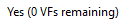
And if you attempt to start another VM you will see the following error:
Other types of NICs handle significantly more Virtual Functions. The 82599ES and X540-AT2 support 63 Virtual Functions.
Guest OS support (widest testing with Intel i350)
Windows supports the SR-IOV Virtual Functions: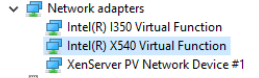
Windows found the drivers (for i350) straight away, but for 82599ES and X540-AT, it was necessary to download the driver from Intel.
Linux supports the i350 SR-IOV Virtual Function with a special driver (Debian 13 tested):
igbvf: Copyright (c) 2009 - 2012 Intel Corporation.
igbvf 0000:00:08.0: Intel(R) I350 Virtual Function
igbvf 0000:00:08.0: Address: 2a:81:8d:da:3a:f0
FreeBSD supports SR-IOV as a physical NIC with the same driver (em/igb) as it would do if running on bare-metal:
igb0: Using 1024 TX descriptors and 1024 RX descriptors
igb0: Using 1 RX queues 1 TX queues
igb0: Using MSI-X interrupts with 2 vectors
igb0: Ethernet address: 6a:2c:61:fd:ff:9b
igb0: link state changed to UP
igb0: netmap queues/slots: TX 1/1024, RX 1/1024
device ( RO) : 0
MAC ( RO): 6a:2c:61:fd:ff:9b
device ( RO) : 1
MAC ( RO): 56:b1:98:a4:e0:31
igb0: Ethernet address: 56:b1:98:a4:e0:31
igb1: Ethernet address: 6a:2c:61:fd:ff:9b
NetBSD does not support SR-IOV on Intel i350 (as below), but will support later Intel NICs (such as X722 and 82599) with the iavf(4) and ixv(4) drivers.
With Intel i350:
With Intel 82599ES:
ixv0: clearing prefetchable bit
ixv0: device 82599 VF
ixv0: Mailbox API 1.3
ixv0: Using MSI-X interrupts with 3 vectors
ixv0: for TX/RX, interrupting at msix0 vec 0, bound queue 0 to cpu 0
ixv0: for TX/RX, interrupting at msix0 vec 1, bound queue 1 to cpu 1
ixv0: for link, interrupting at msix0 vec 2, affinity to cpu 2
ixv0: Ethernet address 86:45:bd:be:6b:0e
ixv0: feature cap 0x81<VF,LEGACY_TX>
ixv0: feature ena 0x1<VF>
However, the ixv(4) driver with 82599ES and X540 NICs was found to not work on NetBSD 10.1_STABLE and 11.99.5 - no traffic was seen, but the link status was detected.
OpenBSD does not support SR-IOV on Intel i350 (as below), but will support later Intel NICs (such as X722 and 82599) with the iavf(4) and ixv(4) drivers:
The ixv(4) driver with 82599ES NIC worked fine on OpenBSD 7.8.
VLANs
N.B. If you have VLANs on your multi-port Intel i350 NICs, as soon as you reboot after enabling SR-IOV on one port, the VLANs will stop working. No traffic will be seen on the VM NICs attached to those VLANs, even if the physical port it is attached to does not have SR-IOV enabled, i.e. it is sufficient to enable SR-IOV on one port of a multi-port NIC to break VLANs across all ports. I found no way round this except for disabling SR-IOV entirely and rebooting again.
You can create VLANs on SR-IOV NIC by ticking the box when creating a new VLAN network (this box will only appear if you have enabled SR-IOV on the NIC you picked):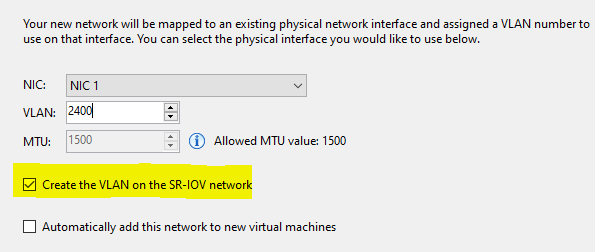
Unfortunately, on Intel i350 multi-port NICs VLANs created in this way do not work either.
With Intel X540-AT2, VLANs work as expected even with SR-IOV enabled on the same NIC, so it is belived that the VLAN problem is limited to Intel i350 NICs.